I'm reading this book about operating systems and I thought it was interesting - although they remain as personal notes - to summarize the teachings a little.
An operating system is software that uses hardware as a resource to support the execution of other software.
Specifically:
- The operating system allows multiple computational tasks to be carried out at the same time. Divide the time of hardware use for each task and change the focus between them, keeping a record of where and how each one was left and then resume it later.
- The operating system also controls the interaction between tasks that run simultaneously. In turn, you can establish rules, such as prohibiting modifying data structures while other software tries to access them. It can also provide isolated memory spaces for private use by certain tasks.
- The operating system can also support controlled interaction of tasks even when they do not run concurrently, in particular some operating systems offer file systems which allow tasks to read and write over what previous tasks did. It is optional since, for example, a washing machine operating system may not need one of these.
- The operating system can also provide support for the controlled interaction of tasks distributed in different systems through networking (networks).
When we think of operating systems, we think of Mac, Linux or Windows, but embedded systems for example can have operating systems dedicated to performing a single task. The simplest systems run a single program directly with the processor; that program reads instructions from inputs such as sensors, performs computations, and writes the output.
Another definition of an operating system is that it is software that provides an abstraction of the hardware on which it operates, taking care of low-level details so that applications can be programmed more easily.
A user perception is that the operating system is what we see graphically on our monitor and use to open programs and carry out tasks, which allows us to click and open different applications. There is a bit of truth in that perception, the operating system provides the service of running different applications. In any case, the operating system offers this possibility not to the human who is clicking around, but also to other programs that are already running on the computer, including the program that displays the icons and the one that manages the user's clicks. The sum of these interfaces that the operating system provides so that programmers can use in their programs is called API, application programming interface.
The reason we can click on a program icon to run it is that general-purpose operating systems include a graphical interface program, which uses the operating system's API to run other programs in response to the click of a mouse or the operation of a keyboard.
Taking Microsoft Windows as an example, it comes with an interface called File Explorer, which gives us features such as the start menu, the ability to click on icons. Everything we see in Windows, the desktop, the folders, the start bar, etc. is part of explorer. Explorer.exe, is the typical one, this failed and the entire Windows interface went away except the open programs because of course they were not part of explorer. So, explorer itself is not the operating system, it is simply a program that comes with it. What the OS really is is what is called the 'kernel'. The kernel is the fundamental part of Windows that provides the API for tasks that require interactions.
In Linux there is the same distinction, the kernel is what provides the services and interfaces through an API, while the shells (like bash) are programs, or also the desktop environments (which sounds bad in Spanish, the Desktop Environments) are graphical interface programs like KDE and GNOME.
Middleware
We already touched on the word API, which is used a lot in web dev, especially for HTTP APIs, but what about middleware?
Middleware is software that, as the name suggests, is in the middle. In the middle between an application and an operating system.
Operating systems and middleware have quite a bit in common. Both serve to support other software, both offer a similar range of services focused on controlled interactions, and, like an operating system, middleware can also establish rules to prevent one task from interfering with another.
But be careful, MW and SO are not the same. The middleware depends on different low-level providers. Instead, the operating system provides its services through its API, using the features offered by the hardware.
Example: The OS can offer API services to read and write files using the hard drive and its ability to write fixed-length blocks of data. The middleware, for its part, can offer API services to write tables in a database, in turn using the OS API, which ends up writing files that form the database.
This layer layout, that is, the middleware layer that is above the operating system but below the programs explains the reason for the name. It is the intermediate layer.
Multiple tasks on one computer
The most fundamental principle of an operating system is that it allows several tasks to run at the same time, without having to wait for each one to finish before executing the next. This makes it possible for computers to run several programs at the same time and, for example, to respond to multiple network requests simultaneously. But the benefit is not only concurrency, but also a more efficient use of resources. For example, while a task is waiting for input (of any type), the PC can continue using the processor to execute another task.
Many words are used to describe these computations. I was using "task", but you can also call them threads, processes or jobs. It depends on the context, because although they seem the same, they are not.
A thread is the fundamental unit of concurrency. Any sequence of scheduled actions is a thread. Running a program may require multiple threads if it needs to run several sequences of actions in parallel.
Even if a program only spawns one thread, it is common for the operating system to be running multiple threads at the same time: one for each running program and others for certain parts of the operating system itself.
When we start a program we are dreaming creating one or more threads. But we are also creating a process. The prcoeso is a container that houses the thread or threads that you started running and protects them from unwanted interactions with other threads running at the same time on the same computer. For example, a thread running in one process cannot accidentally write the memory in use of another process.
Since humans typically start a new process every time they want to execute a new computation, it is easy to fall into the idea that the process is the unit of concurrent execution. This idea is reinforced because in older operating systems each process had exactly one thread, so both concepts were linked one by one and there was no need to differentiate them.
When I talk about the ability to initiate an independent sequence of scheduled actions, I'm going to refer to threading. And when I talk about the ability to protect threads, I'm going to refer to the creation of processes.
In order to support threads, operating system APIs can create new threads and kill existing threads. Within the OS, there must be a mechanism to shift the focus of the computer's attention between the various threads. When the operating system suspends the execution of a thread to make way for another thread, the operating system must store enough information about the first thread to be able to resume its activity at a later time.
Some threads may not be executable at a later time since they are waiting for an input, but in general, an operating system will have many threads to run and will have to choose which one to execute at each moment. This problem of executing threads (schedule threads) has many possible solutions and is an interesting problem because it involves various balances that the system has to make between the interests of the user and the resources of the system.
Interactions between computations
Running multiple threads at once becomes much more interesting when the threads have to interact with each other instead of executing independent tasks. For example, one thread may be producing data and another consuming it. If one thread is writing to memory and the other is reading, you don't want the reader to get ahead of the writer and start reading memory addresses that haven't been written yet. This is just an example of what can happen. In essence, it is about controlling the relative execution time of threads.
Later I will cover different synchronization patterns, including how to keep a consumer synchronized without preempting the producer, and the mechanisms typically used for this synchronization. Some of these mechanisms are provided directly by the operating system, while others require quite a bit of middleware.
I'm also going to emphasize how complicated using sync can get. If one thread has to wait for the other to move forward, what if the second thread is also waiting for the first? Deadlock. To avoid this, middleware is often used a lot. Databases, for example, have an interesting way of dealing with the deadlock problem.
When two computations run in parallel on the same computer, the challenge of controlling the interaction between them is keeping that interaction under control. Following the previous example of the two threads, where one produces data and the other consumes it, there is not much mystery in how the data flows between the two, since they are using the same computer memory. The difficult thing is to regulate the use of that shared memory.
Threads - threads
Computer programs are made up of instructions, and computers carry out steps specified by those instructions. These sequences of computational steps that are executed one after another are called threads.
The simplest programs that can be written are single-threaded programs, with instructions that are executed one after another in a single sequence.
We must differentiate between program and thread; The program contains instructions, while the thread consists of the execution of those instructions. Even for single-threaded programs, this distinction matters. If a program contains a loop, then a short program could generate a long thread of execution. Additionally, running the same program ten times would create ten threads, all running the same program.
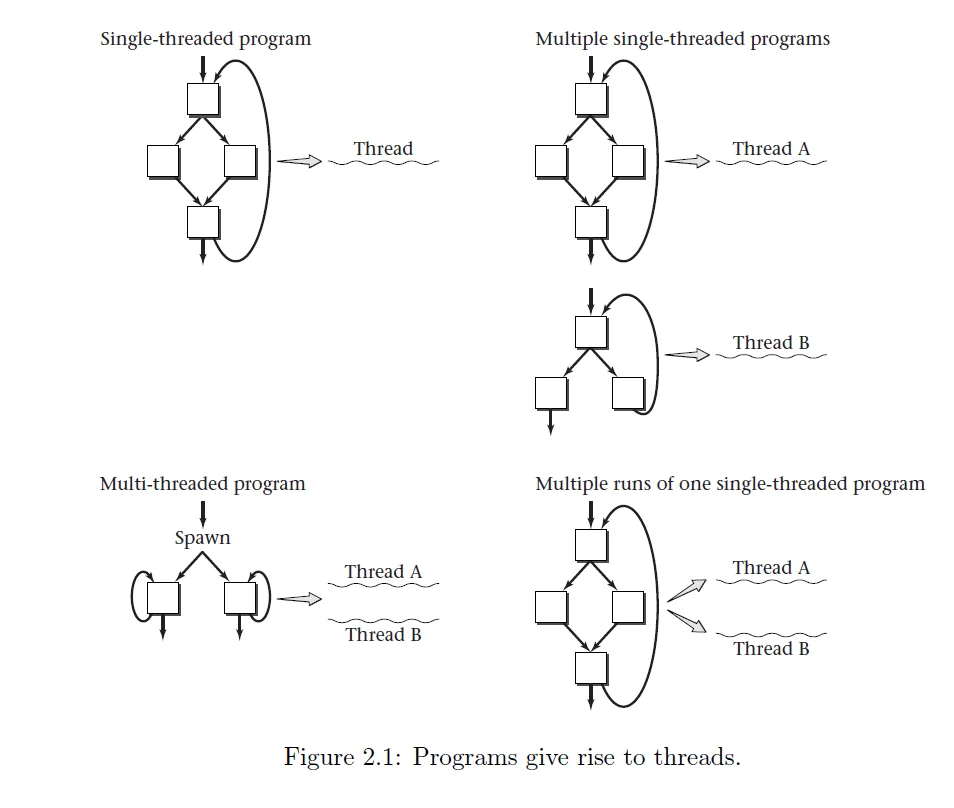
Each thread has a lifetime, which extends from the execution of the first instruction to the time the last instruction is executed. If two threads have overlapping lifetimes, they are called concurrent threads.
One of the fundamental goals of operating systems is to allow multiple threads to run concurrently on the same computer. That is, instead of waiting for the first thread to finish to execute a second, it should be possible to divide the computer's "attention" between both.
If the computer has multiple processors, then it will naturally be possible to run threads concurrently, one per processor. However, operating system users will generally want to run more threads concurrently than the number of processors available, so the operating system must divide processor attention among multiple threads.
Next, we will focus on the case where all threads run under a single processor, unless otherwise mentioned.
Examples of multi-threaded programs
Whenever a program starts running, the computer carries out the instructions in a single thread. That said, if the program is set up to run in multiple threads, the original thread will at some point create a child thread. (Spawn to child thread). This child thread will carry out some actions while the parent thread carries out others. For more than two threads, the program can repeat the thread creation process. Most programming languages have an API for threads that includes a way to create a child thread. Realistically, multi-threaded programs require fine control of the interaction between threads. The examples below are going to be simple, in JAVA.
The example below shows a multithreaded program. The main program first creates a Thread object named childThread. The Runnable object associated with the child thread has a run method that sleeps for three seconds (expressed as 3000 milliseconds) and then prints a message. This run method starts executing when the main procedure calls childThread.start().
Since the run method runs in a separate thread, the main thread can continue with the next steps, sleeping for five seconds (5000 milliseconds) and printing its own message.
public class Simple2Threads {
    public static void main(String[] args) {
        Thread childThread = new Thread(new Runnable() {
            @Override
            public void run() {
                sleep(3000);
                System.out.println("Child is done sleeping 3 seconds.");
            }
        });

        childThread.start();

        sleep(5000);
        System.out.println("Parent is done sleeping 5 seconds.");
    }

    private static void sleep(int milliseconds) {
        try {
            Thread.sleep(milliseconds);
        } catch (InterruptedException e) {
            // Ignore this exception; it won't happen anyhow
        }
    }
}
Reasons for using concurrent threads
With this example we could see how the execution of a single program can result in more than one thread. Beyond how the creation of threads is executed, there is a question to answer, because we should want to execute several threads concurrently instead of waiting for one to finish to create the next. Fundamentally, most of the time it is due to two things:
Responsiveness: Allow the computer system to respond quickly to something external to the system, such as a human user or another computer system. Even if one thread is in the middle of a long calculation, another thread can respond to the external agent. Our example program illustrated responsiveness: both the parent thread and the child thread responded to a timer.
Resource Usage: Keep most hardware resources busy most of the time. If one thread doesn't need a particular piece of hardware, another can make productive use of it.
These two reasons will have many variations; We will see some later. A third reason programmers may want to use concurrent threads is for modularization. That is, complex systems can be created decomposed into several groups of threads that interact with each other.
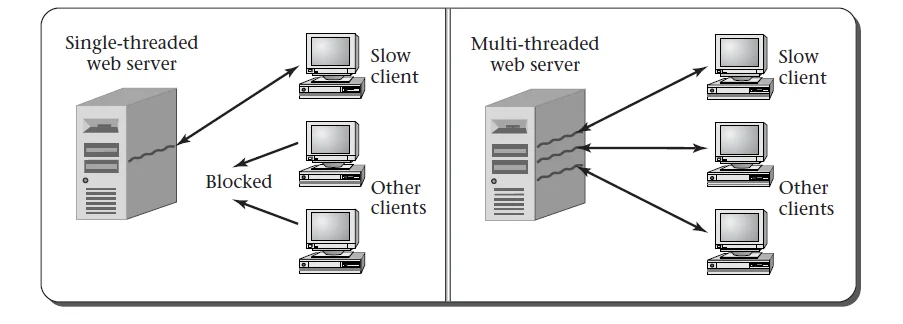
A case study could be that of a web server, which provides many clients (computers that access the web) with different pages over the Internet. When a client makes a request to the server, it sends several bytes of information containing, among other things, the name of the page it wants to access.
Before the server can respond, it needs to read those bytes, usually using a loop that continues reading from the connection until it detects the end of the request. Suppose one of the clients connects with a slow connection; The server may read the first part of the request and then have to wait a considerable time for the rest of the data to arrive over the web from that client.
What happens in the meantime with the rest of the clients who want to send their requests? It would be unacceptable for the entire server to be stopped, unable to serve other clients, just by waiting for a slow client to finish the transfer.
One way servers anticipate and avoid this situation is by using multiple threads, one for each client and each connection. This way, if a thread is waiting, other threads can continue to interact with other clients.
From the client side, a web browser can also illustrate the concept of responsiveness. Imagine that you start loading a fairly heavy page that takes a long time to download. Would you like your computer to freeze until it finishes downloading the page? Probably not; you would expect to be able to continue doing other things while the site finishes loading.
Moving on to the focus of resource utilization, the most obvious scenario is, perhaps, when you have a computer with more than one processor. In that case, if the system executed only one thread at a time, half of the resources would remain unused. Even if the user does not need to perform more than one action at a time, there are certain internal maintenance tasks that the computer could perform to keep the second processor busy.
Even on single-processor systems, resource utilization can justify the use of concurrent threads. Imagine that you want to scan your PC to see if it has viruses while making a photorealistic render. You know that each separate operation takes an hour; If you execute one and then the other, the total time would be two hours. Now, if you try running both at the same time, you may be surprised that they complete in an hour and a half.
The explanation for saving that half hour is that, when scanning files, the program spends most of the time accessing the hard drive, reading files, with only a few sporadic spikes in CPU usage each time it finishes reading a file. Instead, the rendering program uses the CPU almost all the time, with very little disk access. If you run both processes in sequence, a part of the computer would remain idle for long periods. However, by running them simultaneously, both the hard drive and the processor remain active all the time, thus increasing the overall efficiency of the system.
Of course, this assumes that the operating system's scheduler is smart enough to know when to switch CPU focus from rendering to virus scanning each time a file is finished reading.
As we have seen, threads can originate from multiple sources and have various roles. They can be internal parts of the operating system or part of user software applications. Regardless of where they come from, the typical reasons for running threads concurrently remain the same: responsiveness and system efficiency.
Changing threads
In order for the operating system to have more than one thread running on the processor, it needs a mechanism that allows it to switch focus between them. In particular, you must be able to interrupt the execution of a thread in the middle of its sequence of instructions, work on other threads, and then return to continue from where you left off.
To explain this as simply as possible, let's assume that each thread is executing code that, from time to time, includes explicit instructions to give control to another thread. Once we have a good understanding of how this mechanism works in this scenario, we can analyze more realistic cases in which the thread does not contain these instructions and is automatically interrupted to switch context.
Suppose we have two threads, A and B, and we use A1, A2, A3, etc., to refer to the instructions of thread A, and B1, B2, B3, etc., to refer to those of thread B.
In this case, a possible execution sequence could be the following:
| THREAD A | THREAD B |
|---|---|
| A1 | |
| A2 | |
| A3 | |
| switchFromTo(A, B) | |
| B1 | |
| B2 | |
| B3 | |
| switchFromTo(B, A) | |
| A4 | |
| A5 | |
| switchFromTo(A, B) | |
| B4 | |
| B5 | |
| B6 | |
| B7 | |
| switchFromTo(B, A) | |
| A6 | |
| A7 | |
| A8 | |
| switchFromTo(A, B) | |
| B8 | |
| B9 |
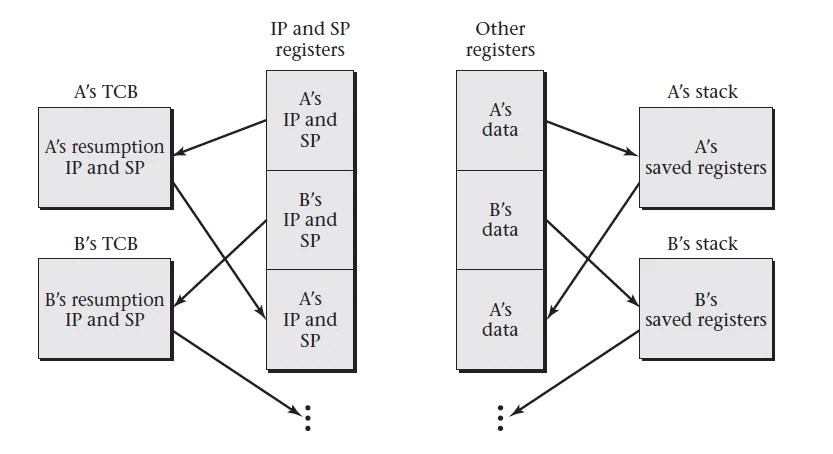
In order for the operating system to switch threads, it needs to maintain information about the state of each thread, such as the exact position from which it should resume execution. If this information is stored in a specific memory block for each thread, we can use the address of those blocks to refer to the threads. Each block of memory that contains this information is called TCB (Thread Control Block). Therefore, another way of saying that we use the memory addresses of these blocks is that we use pointers to the TCB of the corresponding thread.
Our fundamental mechanism for switching threads will be the switchFromTo method, which takes as parameters two of these TCB (Thread Control Blocks): one that specifies which thread we are switching from and another that indicates which thread we are switching to. In the above example, A and B are pointers that point to the TCBs of the respective threads A and B, and we use them to switch between the outgoing and incoming threads.
For example, thread A's program, after the instruction A5, has code to switch from A to B, and thread B has code after B3 to switch from B to A. This assumes that each thread knows its own identity and also that of the thread to which it should transfer control. Later we will see how to eliminate this premise, which is not entirely realistic.
For now, let's focus on how the switchFromTo method could be written so that switchFromTo(A, B) saves the execution state when switching from A to B, allowing the thread to continue from where it stopped when resuming execution from B to A.
We have already seen that the state information that must be saved not only includes the position in the program, known as Program Counter (PC) or Instruction Pointer (IP), but also the contents of the registers (registers).
Another critical part of the runtime state, especially in programs compiled with most high-level languages, is the stack. The stack stores information such as local variables, return addresses, and other data necessary for the execution of functions. To manage the stack, each thread uses a Stack Pointer Register, which indicates the current position in memory of the top of the stack.
When a thread resumes execution, it must find the stack exactly as it left it. For example, let's imagine that thread A places two elements on its stack and then pauses while thread B executes. Upon resuming execution, A should find those two items intact on his stack, even if B also used his own stack during that time. This is achieved by giving each thread its own stack, reserving an independent portion of memory for each one.
When A is running, its Stack Pointer (SP) points somewhere within the area of memory reserved for A's stack, indicating how much space it is occupying. When switching to thread B, we must save A's stack pointer along with the other registers. While B executes, its own stack pointer will move within the memory area allocated to B, according to the push and pop operations it performs.
Having established that we need to maintain different stacks and pointers, we can simplify saving all the other registers by putting them on the stack just before switching threads, and removing them from the stack just after returning to the thread. We can use this approach to mark in the code when we exit and go to the next thread using outgoing and next as the two pointers to the TCB.
When we change from A to B, outgoing would be A and next would be B. Then when changing from B to A, outgoing would be B and next would be A.
With these bases, our code would have the following general form:
- Stack each record on the stack (of the outgoing thread)
- Save the stack pointer in
outgoing->SP - Load stack pointer from
next->SP - Save the L tag address in
outgoing->IP - Load
next->IPand jump to that address - L:
- Unstack each record from the stack (from the outgoing thread when it resumes)
Note that the code before the (L) tag is executed at the time of switching from the outgoing thread, while the code after that tag is executed later, upon resume execution when another thread switches back to the original thread.
This code not only saves the stack pointer of the outgoing thread, but also restores the stack pointer of the next thread. Later, the same code will be used to switch back. Therefore, we can count on the original thread's stack pointer to have been restored when control jumps to label L. Thus, when the registers are unstacked, it will be from the original thread's stack, coinciding with the push operations at the beginning of the code.
We can see how this pattern is implemented in a real system by looking at the thread switching code in Linux for the i386 architecture.
This code is real, extracted from the Linux kernel, although some peripheral complications have been removed to simplify it. The stack pointer register is called %esp, and when the code starts executing, the %ebx and %esi registers contain the outgoing and next pointers, respectively. Each of these pointers is the address of a TCB (Thread Control Block). The location at offset 812 within the TCB contains the thread's instruction address (i.e., the IP), and the location at offset 816 contains the stack pointer (SP).
pushfl # Save the flags on the stack of the outgoing thread
pushl %ebp # Save %ebp on the outgoing thread's stack
movl %esp, 816(%ebx) # Save the stack pointer of the outgoing thread in the TCB
movl 816(%esi), %esp # Load the stack pointer of the next thread from its TCB
movl $1f, 812(%ebx) # Store the address of tag 1,
                     # where the outgoing thread will resume
pushl 812(%esi) # Save the instruction address
                     # where the next thread will resume
ret # Extract the instruction address and jump to it

1:
popl %ebp # When resuming the outgoing thread later, restore %ebp
popfl # Restore the flags
This code shows how the system saves and restores both register state and stack positions, allowing threads to suspend and resume correctly.
code explanation:
General context:
- %ebx contains the pointer to the TCB of the outgoing thread.
- %esi contains the pointer to the TCB of the next thread that will be executed (next).
- %esp is the stack pointer that indicates the current position on the stack.
- %ebp is the base pointer, used as a reference for accessing local variables and parameters within a function.
- pushfl/popfl are instructions that save/restore processor flags, which contain information about the state of the CPU (such as whether the last operation resulted in zero, whether there was an overflow, etc.).
Line by line breakdown:
-
pushfl
Saves the flags on the stack of the outgoing thread- What does it do?
This instruction pushes the contents of the flags register onto the stack. Flags include information such as the status of arithmetic operations, the interrupt bit, etc. It is important to save them so that when the thread resumes, the CPU state is exactly the same as before the suspension. - Why is it important?
If you do not save the flags, when resuming the thread you could have unexpected behavior, since the CPU could misinterpret the result of previous operations.
- What does it do?
pushl %ebp
Save %ebp on the outgoing thread's stack
- What does it do?
The%ebpregister is used as base pointer on the stack, marking the start of the stack frame of the current function. Saving it ensures that when you return to this thread, the stack structure is intact and local variables are accessible correctly.- Why is it important?
Preserving%ebpallows functions to continue executing as if they had never been interrupted.
- Why is it important?
-
movl %esp, 816(%ebx)
Save the stack pointer of the outgoing thread in the TCB- What does it do?
The current value of%esp, which points to the top of the outgoing thread's stack, is saved in the outgoing thread's TCB at offset 816. This saves the exact position on the stack for later resumption. - Why is it important?
By resuming the outgoing thread, the system will know exactly where the stack was and can restore it so that execution continues without errors.
- What does it do?
-
movl 816(%esi), %esp
Loads the stack pointer of the following thread from its TCB- What does it do?
The next thread's saved stack pointer (stored in the TCB at offset 816) is retrieved and loaded into%esp. Now the processor is ready to use the next thread's stack. - Why is it important?
Changing the stack pointer to that of the next thread ensures that any stack operations (such as function calls or manipulation of local variables) will affect the new thread and not the previous one.
- What does it do?
-
movl $1f, 812(%ebx)
Save the address of tag 1 in the TCB of the outgoing thread- What does it do?
The instruction saves the address of tag1in the outgoing thread's TCB at offset 812. This address acts as a marker for where execution should continue when the outgoing thread is resumed. - Why is it important?
Without this address, the outgoing thread would not know where to continue its execution, which could lead to erratic behavior or memory corruption.
- What does it do?
pushl 812(%esi)
Saves the instruction address where the next thread will resume
- What does it do?
The instruction address where the next thread should continue (stored in offset 812 of its TCB) is pushed onto the stack. This value is the Instruction Pointer (IP) of the next thread.- Why is it important?
This allows the processor to know, when executing theretinstruction, which exact address to jump to in order to resume execution of the next thread.
- Why is it important?
-
ret
Pops the instruction address from the stack and jumps to it- What does it do?
Theretinstruction pops the instruction address off the stack (which was placed there on the previous line) and transfers CPU control to that address, effectively shifting execution to the next thread. - Why is it important?
retis the statement that ends the context switch and begins execution of the next thread.
- What does it do?
Resuming the original thread:
When you eventually switch back to the original thread (outgoing), execution will continue from tag 1. At that point, it is necessary to restore the registers and flags that were saved before suspending the thread.
1:
Label where the outgoing thread resumes execution- This is the address previously saved in
812(%ebx). When another thread decides to return control to the original thread, execution will continue from here.
- This is the address previously saved in
popl %ebp
Restore %ebp when resuming outgoing thread- What does it do?
Retrieves the original value of%ebpfrom the stack, ensuring that the stack frame is correctly restored for functions that were running before the context switch.
- What does it do?
popfl
Restores flags when resuming the outgoing thread- What does it do?
Retrieves the CPU flags from the stack, returning the CPU state to the exact moment before the interrupt.
- What does it do?
Process summary:
-
Before the thread switch (context switch):
- Save critical registers and CPU status (flags).
- You save the stack pointer and the instruction address in the TCB of the outgoing thread.
- You restore the stack pointer and the instruction address of the next thread.
- You jump to the execution of the next thread.
-
When resuming a thread:
- You restore the stack pointer and the thread registers.
- You will recover the exact state of the CPU (flags).
- You continue executing from where the thread was interrupted.
Now that we understand the main idea of how a processor switches from one running thread to another, we can eliminate the assumption that each thread needs to explicitly know the names of the outgoing and incoming threads (next). That is, we want to get away from the idea that we must identify threads as A and B in order to make the change.
It's easy to know which thread we're switching from if we simply keep an up-to-date record of which thread is running at all times. This can be achieved by saving a pointer to the current thread's TCB in a global variable called current.
This leaves us with the question of how the next thread to execute is chosen. To solve this, the operating system must keep track of all available threads in some data structure, such as a list. From this, a procedure called chooseNextThread() is implemented, which consults said structure and, using some scheduling policy, decides which will be the next thread to run.
Later we will see how to implement this mechanism, but for now we can summarize it in a procedure called yield(), which performs the following four steps:
outgoing = current;
next = chooseNextThread();
current = next; // update the global variable with the new thread
switchFromTo(outgoing, next);
Now, whenever a thread decides to pause its execution and allow other threads to run for a while, it should simply call yield(). This approach is similar to that taken by real systems like Linux.
A complication in multiprocessor systems is that the current variable must be maintained independently *per-processor basis, since each core may be running a different thread.
The process of switching from one thread to another is commonly known as context switching, because the execution context of one thread is changed to that of another.
PREEMPTIVE MULTITASKING
For now we saw how changing threads could be carried out in systems that carry out what would be called cooperative multi-tasking, where the program of each thread has explicit code at which point it should change threads.
Something more realistic in operating systems is what is called preemptive multitasking, where the program code has nothing about thread switching, however the thread switching happens more or less automatically from time to time.
One reason to prefer this way of switching threads is that buggy code in one thread will not disrupt the execution of the rest. For example, consider a loop that is expected to run a certain number of times. In a multitasking system, it would seem safe to perform thread switching before or after the loop, rather than within the body of the loop. However, a mistake could turn that loop into an infinite one, blocking the processor forever. With preemptive multitasking, the thread could run indefinitely, but at least it would pause from time to time to allow other threads to progress.
Another reason to use preemptive multitasking is to allow thread switching to occur when the goals of responsiveness and efficient use of resources are best met. For example, the operating system can predict when to execute a thread that is waiting or when to use a hardware component that is not being used.
Even with preemptive multitasking, it can be useful for a thread to occasionally voluntarily relinquish control to other threads rather than running until interrupted by the operating system. That's why systems that work this way also include a function like yield(). The name may vary depending on the API, but generally includes the term yield.
Preemptive multitasking does not require any fundamentally different mechanism for thread switching; you only need a system of hardware interrupts.
Typically, a processor executes instructions consecutively, one after another, deviating from this flow only when there is an explicit jump instruction. However, there is another mechanism by which external hardware (such as a hard drive or network card) can signal that it needs attention. A hardware timer may also require attention periodically, for example every millisecond.
When an I/O system (I/O) or a timer needs attention, an interrupt occurs, which is equivalent to a set of instructions being forcibly inserted between the instructions that are being executed and those that would follow. Instead of continuing with normal execution, forced code, known as the interrupt handler, is executed.
The interrupt handler is part of the operating system, it is responsible for managing hardware devices and executes a *return from interrupt instruction when it finishes, resuming the instruction that was about to be executed before the interrupt occurred. It is important to clarify that, for this to work correctly, the interrupt handler must be careful: it must save all logs at the beginning of its execution and restore them at the end.
Using this interrupt mechanism, an operating system can offer preemptive multitasking. When an interrupt occurs, the interrupt handler first saves registers to the stack of the current thread and takes care of immediate needs, such as receiving data from a network interface driver or updating the system time in a millisecond.
Then, instead of simply restoring the registers and executing a return from interrupt statement, the interrupt handler checks to see if it would be a good time to preempt the current thread and switch to another.
For example, if the interrupt signals the arrival of data that a thread has been waiting for a long time, it might make sense to switch to that thread. Or, if the interruption is coming from the timer and the current thread has been running for a long period of time, it might be appropriate to give another thread a chance.
In any case, if the operating system decides to interrupt the current thread, the interrupt handler will switch threads using a mechanism such as the switchFromTo procedure. This thread switching includes switching to the new thread's stack, so when the interrupt handler restores the registers before returning, it will be restoring the registers of the new thread.
The register values of the previously executing thread will remain safe on their own stack until that thread is resumed.
Original article in Spanish: Sistemas Operativos: Abstracción del Hardware, Concurrencia, Middleware y Más Allá