A while ago I came across a question that I couldn't get out of my head: what if I set up my own WordPress hosting? Not a generic one, not one overloaded with cPanel and a thousand options that no one uses, but something simple, fast, cheap and that is really optimized for people who want to start their blog, their site, their store. This is how SenseiPress was born.
I'm not good with creative ideas, I can't think of things that I'm passionate about and unique, but WordPress hosting? It is something that would be useful to me, something that by putting it together I am going to learn a lot, and something that could potentially be useful to someone.
🧪 The idea and the first prototype
The reality is that I don't know much about WordPress hosting in particular, but I have migrated several sites, my own and those of others, and I always had good results. The recipe: Linux, PHP-FPM and Nginx. I recently introduced a new ingredient, Docker.
So, I said, why don't I automate my deployment processes, which work quickly, and set up hosting on top? Surely you can. Furthermore, I can charge a fraction of what the VPS costs, it would be cheap and it will have good performance. So I decided to put together a small prototype.
I started with two VPS. One acts as a load balancer, and the other is the first of several WordPress pools, each capable of running up to 5 Docker instances, all isolated and using a shared MariaDB database.
To avoid exposing unnecessary ports, all communication between instances occurs within a private intranet. Each user receives their subdomain and the load balancer is responsible for redirecting everything accordingly. The load balancer is nothing more than a server in Caddy that redirects according to subdomains to different internal IPs. Why Caddy and not Nginx? Because Caddy has a REST API, so with a little configuration from a server I can add and remove rules. It also has automatic SSL provision, so I forget about Certbot. A relief.
⚙️ What's under the hood
All the infrastructure runs in Docker containers, obviously with their appropriate volumes to be able to partition the space and also data persistence. In the main VPS, we have 4 fundamental pieces.
- The Caddy server (responsible for directing external to internal traffic - think tusub.senseipress.com -> the WordPress site)
- The dashboard in Next.js, the visible face of the senseipress.com page, the user admin panel and everything related to page management. This has its own database in SQLite.
- A small API in Go, which with validations and security allows exposing certain controlled endpoints to the Next backend to delegate subdomains and manage internal traffic rules
- An instance of HAProxy to, depending on the port chosen, redirect SFTP traffic to the necessary WordPress. Essentially, it allows me to log into VPS_1 via SFTP and reach the corresponding instance via the intranet.
In the VPS_Pools as I call them, we are going to have
- WordPress instances, the amount will depend on the tier. Each instance is volume partitioned and is its own Docker image with its own port.
- Database in MariaDB
- An API in Go that allows fine handling of different actions on Docker containers through HTTP. From migrating sites, making backups, changing admin passwords, factory reset and more.
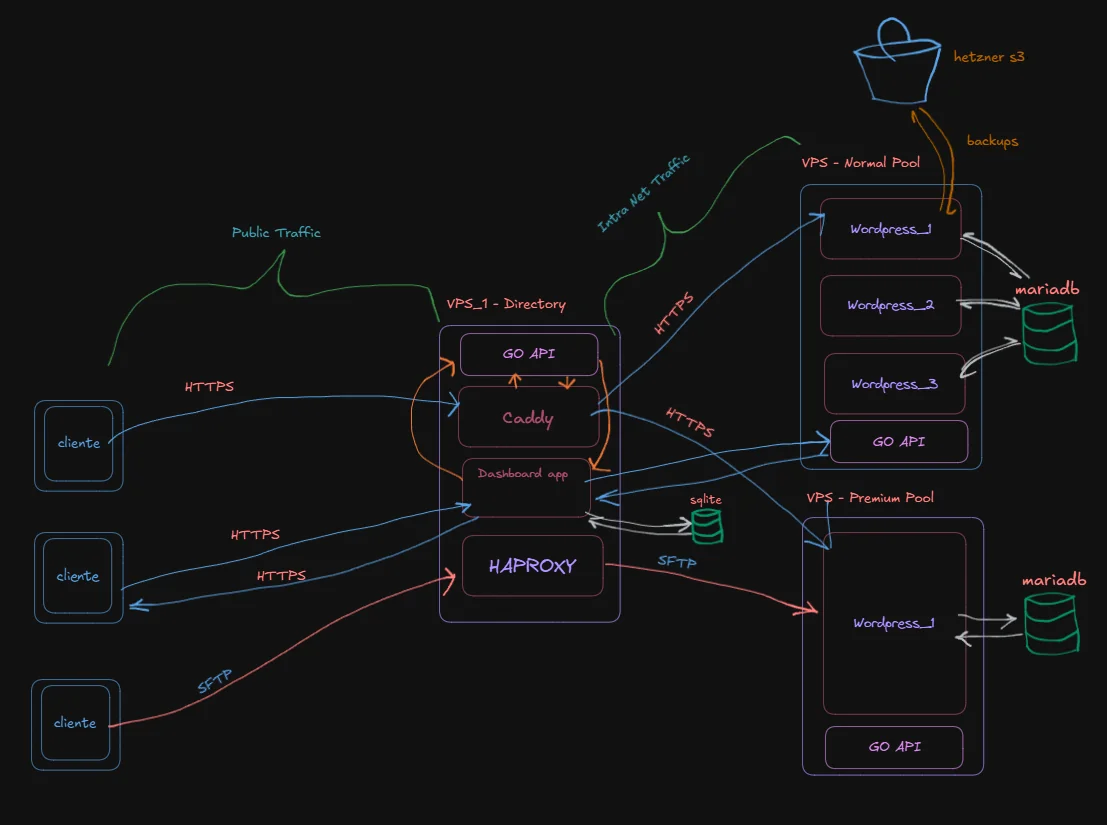
And not much more than that. Even so, it all seems small, but there are lines and lines of code in scripts, endpoints and automations to create the following flow:
- User chooses subdomain (in Next.js app, saved in SQLite)
- The subdomain is registered in Caddy thanks to the Go API
- You are assigned a free WordPress (in some of the intranets, this instance is virgin and ready to use). If there are no free instances, a new VPS is deployed, everything is installed from 0 and then assigned. If this happens, there is at most a 2 minute delay. If this does not happen, assigning a site is a matter of 2 seconds. It can be optimized (go ahead to never have full instances, but this would be an NTH)
- Done actually - there's nothing left to do. From the SenseiPress dashboard, you can assign your domain if you already have one, you just need a CNAME (the easiest rule) in your provider's dashboard and that's it.
🖥 The SenseiPress dashboard
As I mentioned, I built the frontend with Next.js and a SQLite base (better performance and simpler for this MVP). Includes:
- Marketing pages.
- User panels to view your sites, make backups, and more.
- Admin panel to manage deployments, resources and backups.
All actions:
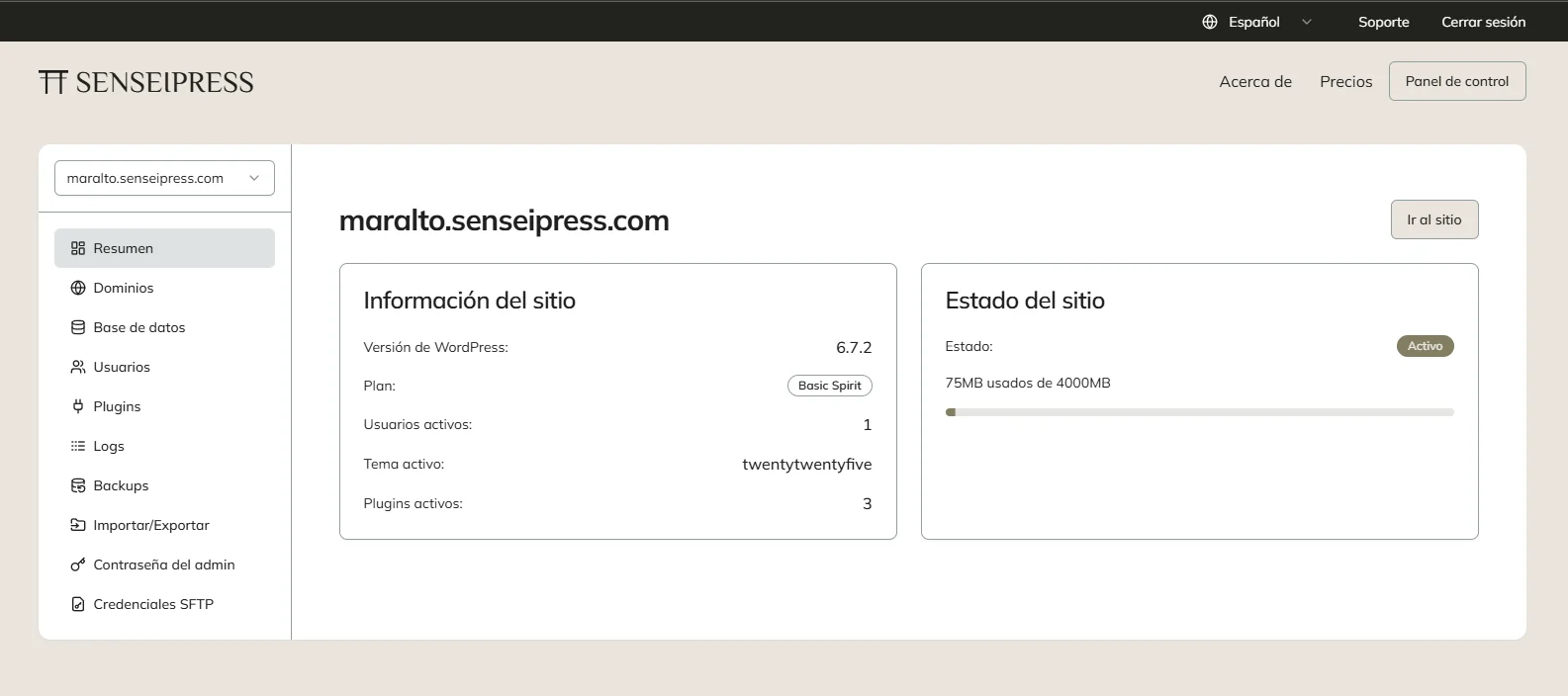
They are actually communications via HTTP to the Go API that lives on the same WordPress VPS. And this is run through the Next.js server - it is not a direct communication between the Sensei front end and the associated pool.
💸 Plans and prices
For the launch, I have planned:
- Base plan at $3999 pesos per month.
- 10 free accounts to test and receive feedback.
- An advanced plan at $9999/month with more resources.
- Annual discounted prices.
🧠 What I'm improving now
- Resource monitoring: expanding
docker-memory-apito be more verbose. - Reliable backups: of WordPress data and also Caddy configs.
- Improvements to the dashboard: especially in billing and downloading backups.
- Email alerts: for critical events or automatic notifications.
The biggest challenge
What is most difficult for me now is to change the chip from programmer to marketing, start putting together a good landing page and prepare everything for the sale. I have a lot of things to do there, a lot to advertise, leads to look for. But the base product is there, it works, what I learned has no name.
Follow me on x.com for more updates
Original article in Spanish: Cómo construí SenseiPress: un hosting de WordPress hecho a mano